
WillyWeather
WillyWeatherWeather
4.7439.00 Reviews
- Version
- 4.1.9
- Installs
- 1.00M
- Age Rating
- Everyone
Screenshots
Our Review of WillyWeather
 Analysis by Appyee
In a shared household, a weather app is most useful when it helps everyone make a practical decision without turning into another family-management system. I’d use WillyWeather as a common point of reference: one person can check conditions before a commute, while someone else looks ahead to a walk, a school pickup, or time near the coast. Its mix of forecast details and location choices makes it more useful for those conversations than a glance at a single temperature.
That shared role also sets a sensible boundary. I wouldn’t assume that everyone’s preferences, saved places, or alerts automatically sync between phones, or that the app provides household accounts. Each person should check how the app is set up on their own device rather than treating one installation as a shared dashboard. If several people rely on the same forecast, it helps to agree on which location to check and to compare the relevant time window before making plans.
A shared forecast, without assuming shared controls
A realistic example is a weekend outing where one person is driving and another is choosing when to head out. The driver can check the forecast for the destination, while the other person looks at the hourly picture and any relevant wind or tidal details. That is a more useful routine than relying on a broad “sunny” label: the conditions at the departure point may not answer what you need to know at the beach or along the route.
For households with different schedules, multiple locations can help keep the check focused. I’d give places clear, recognizable names if the app allows it, and remove destinations that no one checks anymore. That small bit of housekeeping matters: a crowded location list makes it easier to consult the wrong place in a hurry. Before leaving, I’d also make sure the selected forecast is for the actual destination rather than assuming a nearby town is interchangeable.
Who benefits most from the detail
The strongest fit is someone who makes plans around changing outdoor conditions: coastal residents, anglers, surfers, walkers, or commuters who want more than a simple daily icon. The tidal information gives WillyWeather a particular edge for people whose plans depend on the coast, while wind and UV details can add context for outdoor activities. I find that breadth useful when the question is not just “Will it rain?” but “What conditions should I prepare for?”
It may be more app than a casual user needs. If you only check whether to carry a jacket and prefer a minimal screen, a basic weather app or the built-in forecast on your phone may be quicker. Likewise, someone who needs specialized, professional-grade meteorological tools should not assume that a consumer forecast app replaces those tools. WillyWeather is most convincing as an everyday planning companion, not as a guarantee or a substitute for specialist advice.
How I’d use alerts and maps thoughtfully
Alerts work best when they answer a decision you actually need to make. I’d choose a small number of conditions that would change my plans, rather than enabling every possible notification. Too many alerts can become background noise, and then the important warning is easier to overlook. For a household, it is also worth agreeing who is monitoring a particular outing; duplicate notifications on several phones can create clutter without improving the plan.
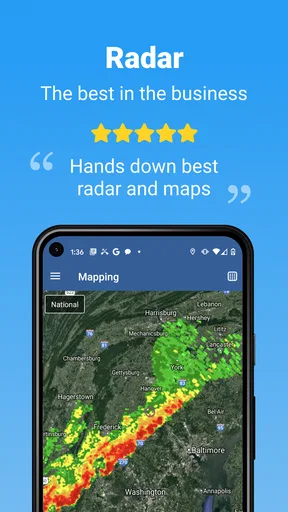
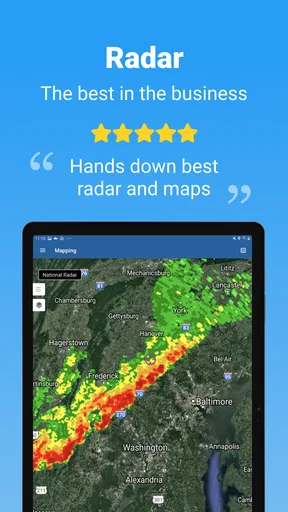
Maps and radar are useful as a visual check, but I treat them as context rather than a promise about exactly what will happen at my doorstep. When the day matters, I’d compare the hourly forecast with the map and check again closer to departure. A view of approaching weather can help explain a forecast, while the forecast itself is easier to use for deciding whether to leave now or wait. This two-step habit is especially helpful when a short outdoor window matters more than the general outlook.
People often wonder whether a weather app needs much setup to be useful. Here, the practical answer is to start with the places you genuinely care about, then explore the details you will use, such as hourly conditions, tides, or alerts. You do not need to turn on everything to get value from it. If you travel, adding a destination before the trip is more useful than trying to interpret a nearby location after plans are already underway.
Weather information in a family setting
The app is rated for Everyone, which makes its age context broad, but that does not mean I’d hand a young child responsibility for interpreting changing conditions. A parent or caregiver should make the final call for activities where weather creates a safety concern. For older children, checking a forecast together can be a simple way to teach practical planning—what wind or UV information means for a day outside—without treating an app prediction as certainty.
On a shared device, I’d keep the boundary straightforward: each person should know whose locations and notification choices are being used, and anyone borrowing the phone should avoid changing settings without checking first. That is ordinary device courtesy, not a special family feature. If privacy or separate personal settings are important to your household, individual devices and individual setup are the safer assumption than expecting the app to manage account boundaries for you.
Getting Started with WillyWeather
I was immediately drawn to the sleek design of WillyWeather when I first opened it. The interface is user-friendly, with a clean layout that doesn’t overwhelm you with information. Navigating through the app is a breeze, and I found myself quickly locating the features I was most interested in.
Setting up was straightforward. You can personalize the app to display weather updates for multiple locations, which is perfect if you travel frequently or just want to keep tabs on the weather in different cities. It’s like having a global weather station in your pocket!
Features That Stand Out
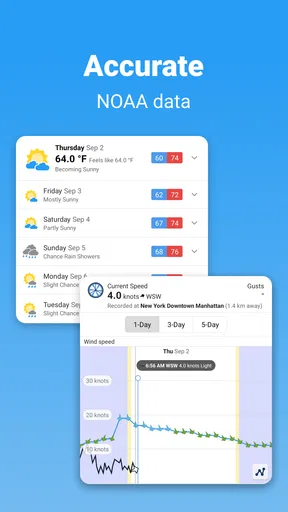
One of the standout features of WillyWeather is its detailed forecasts. The app provides hourly updates, which are incredibly useful for planning your day. If you’re anything like me and hate getting caught in the rain without warning, you’ll appreciate the level of detail here. The forecasts cover everything from temperature to wind speed and even UV index, so you’re never left guessing.
I was particularly impressed by the tidal information. For those who live near the coast or enjoy activities like fishing and surfing, this feature is indispensable. WillyWeather goes beyond just telling you the weather; it helps you plan life around it.
Personal Touches
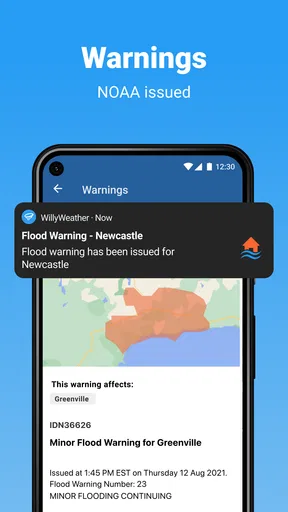
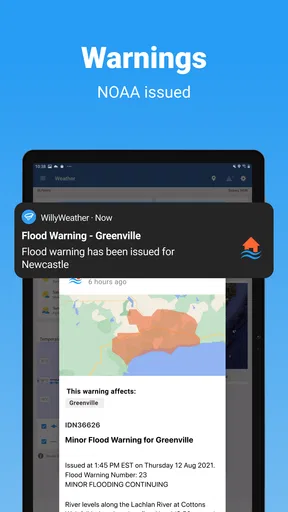
What I really love about this app is the ability to customize alerts. You can set notifications for specific weather conditions, so you’re always prepared for whatever comes your way. Whether it’s a sudden drop in temperature or an unexpected storm rolling in, WillyWeather keeps you informed.
The app also includes radar images and maps that are surprisingly detailed. It’s like having a mini weather station on your phone, giving you a visual representation of what’s happening in the skies above you.
Usability and Performance
In terms of usability, WillyWeather scores high. The app runs smoothly, with quick load times and no noticeable lag. I’ve used it both on Android and iOS, and the experience is consistently good across both platforms. It’s clear that a lot of thought has gone into ensuring the app is as user-friendly as possible.
The app’s performance is reliable, and I haven’t encountered any crashes or bugs during my time using it. It’s a solid, well-built application that does its job without any fuss.
Room for Improvement
While WillyWeather is impressive, there’s always room for a little improvement. I’d love to see more integration with smart home devices. Imagine having your lights change color based on the weather forecast, or your thermostat adjusting automatically to the predicted temperature. It’s something that could take the app to the next level.
Also, while the app is free, some features are locked behind a premium subscription. It’s not a dealbreaker, but if you’re looking to unlock the full potential of WillyWeather, you might need to consider the extra cost.
Final Thoughts
In conclusion, WillyWeather is an excellent choice for anyone seeking a comprehensive weather app. Its detailed forecasts, tidal information, and customizable alerts make it a standout option. The app is a fantastic tool for staying informed and ready for whatever the weather has in store.
Whether you’re planning a weekend getaway or just trying to decide if you need a jacket, WillyWeather has got you covered. So go ahead, give it a try, and never let the weather catch you off guard again!
Cost, version, and choosing the right level of detail
WillyWeather is a free weather app from WillyWeather (Legacy), with in-app purchases priced from $3.49 to $36.00 per item. I’d start with the free experience and decide only after using it whether any paid option solves a real need. If a feature you want turns out to be part of a purchase, weigh that against how often you would use it; occasional forecast checks may not justify spending, while frequent coastal planning could make added functionality more worthwhile.
The current version is 4.1.9, and the app’s release date was September 24, 2018. It has a 4.7 average from around 60,000 ratings and more than 1 million installs. Those figures suggest it has found a substantial audience, but they don’t tell me whether its forecasts suit every location or whether a particular feature matches your routine. I’d judge it by checking the places and conditions that matter to you rather than relying on popularity alone.
For device compatibility, the listed minimum operating system is 7.1. If you are installing it on an older device, check that your operating system meets that requirement before making it part of a household routine. And if you are choosing between WillyWeather and a conventional weather app, the deciding question is simple: do tides, detailed hourly planning, maps, and tailored alerts add enough value for you to tolerate a fuller experience? If not, a simpler alternative is likely the better fit.
My household verdict
I’d recommend WillyWeather to a household that spends time outdoors and wants a shared vocabulary for making weather-dependent plans, especially where coastal conditions matter. Its useful detail can support a conversation, but the app does not remove the need for people to coordinate who checks what, nor should anyone treat a forecast as certainty. For a family that mainly wants a quick temperature glance, it may feel unnecessarily detailed; for people who plan around the wind, tides, or changing hourly conditions, it offers more practical context than a stripped-down forecast.
My advice is to set up only the locations you actually use, keep alerts selective, and make a fresh check before plans that depend on the weather. That approach gives the app a clear role without asking it to manage the household or make decisions for you. If those are the needs you have, WillyWeather is a worthwhile free starting point, with paid extras to consider only when they fit the way you genuinely use it.
Verdict
Strengths of WillyWeather
- Accurate local weather forecasts.
- User-friendly and intuitive interface.
- Detailed graphs for weather trends.
- Customizable notifications for alerts.
- Comprehensive tide and marine data.
Limitations of WillyWeather
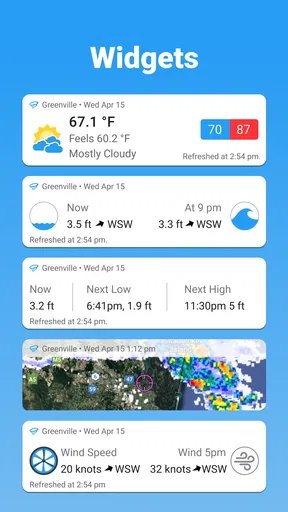
- Limited customization of widgets.
- Some features require premium access.
- Occasional lag in data updates.
- Ads present in the free version.
- No integration with smart home devices.
Similar Picks in This Category
View All
Weather - By Xiaomi
Xiaomi Inc.4.1

Weather & Radar Forecast
WetterOnline4.8

Weather
OneLouder Apps4.6

AccuWeather: Weather Radar
AccuWeather3.6

The Weather Channel - Radar
The Weather Channel4.6

1Weather Forecasts & Radar
OneLouder Apps4.3
Frequently Asked Questions
What features does WillyWeather offer to improve my weather tracking experience?
WillyWeather provides a comprehensive set of features including detailed forecasts, interactive maps, and real-time updates. It also offers tide predictions, moon phases, and UV index information. Users can customize notifications for weather changes, ensuring they are always prepared for any condition right at their fingertips.
How accurate are the weather forecasts provided by WillyWeather?
WillyWeather sources its data from reputable meteorological organizations to provide highly accurate forecasts. The app uses advanced algorithms to analyze regional weather patterns, ensuring users receive precise short-term and long-term forecasts. Nevertheless, weather conditions can change rapidly, so checking frequently is advised.
Is WillyWeather available for both Android and iOS devices?
Yes, WillyWeather is available for both Android and iOS platforms. Users can download the app from the Google Play Store or Apple App Store. It is designed to work seamlessly across devices, offering a consistent and user-friendly experience regardless of the operating system.
Does WillyWeather offer any premium features, and are they worth the upgrade?
WillyWeather offers premium features such as ad-free usage, advanced map layers, and more detailed weather insights. For users who rely heavily on weather data, the premium plan can enhance the app's functionality, making it a worthwhile investment for those seeking more in-depth weather analysis.
How user-friendly is the interface of WillyWeather for new users?
WillyWeather boasts a clean and intuitive interface designed to be user-friendly for both beginners and experienced weather enthusiasts. The app's layout makes it easy to navigate through various features, and customization options allow users to tailor the experience to their personal preferences, ensuring ease of use.
